 +
For a brand planning TikTok unboxing videos, the key choice is what happens after the box opens. Show what arrives, reveal one useful detail, then let the viewer see the product in use. Packaging sets up the scene; it should not be the whole story. This guide walks through an original lunch-bag example, with shot choices, sound and lines you can adapt to your own product.
You do not need an elaborate set to make the idea clear. You need a real item, a buyer question and a view of the detail that answers it. A neat package can create interest, but the next shot should reward that interest. If you sell a lunch bag, show how a lunch container fits. If you sell a lamp, show what it lights. Start with the job the buyer cares about.
An unboxing can show more than the item inside. It can show scale, parts, setup or a small design choice that is hard to judge from a product photo. Pick one of those things before you film. That gives the opening a point and helps you cut shots that look pleasant but add little.
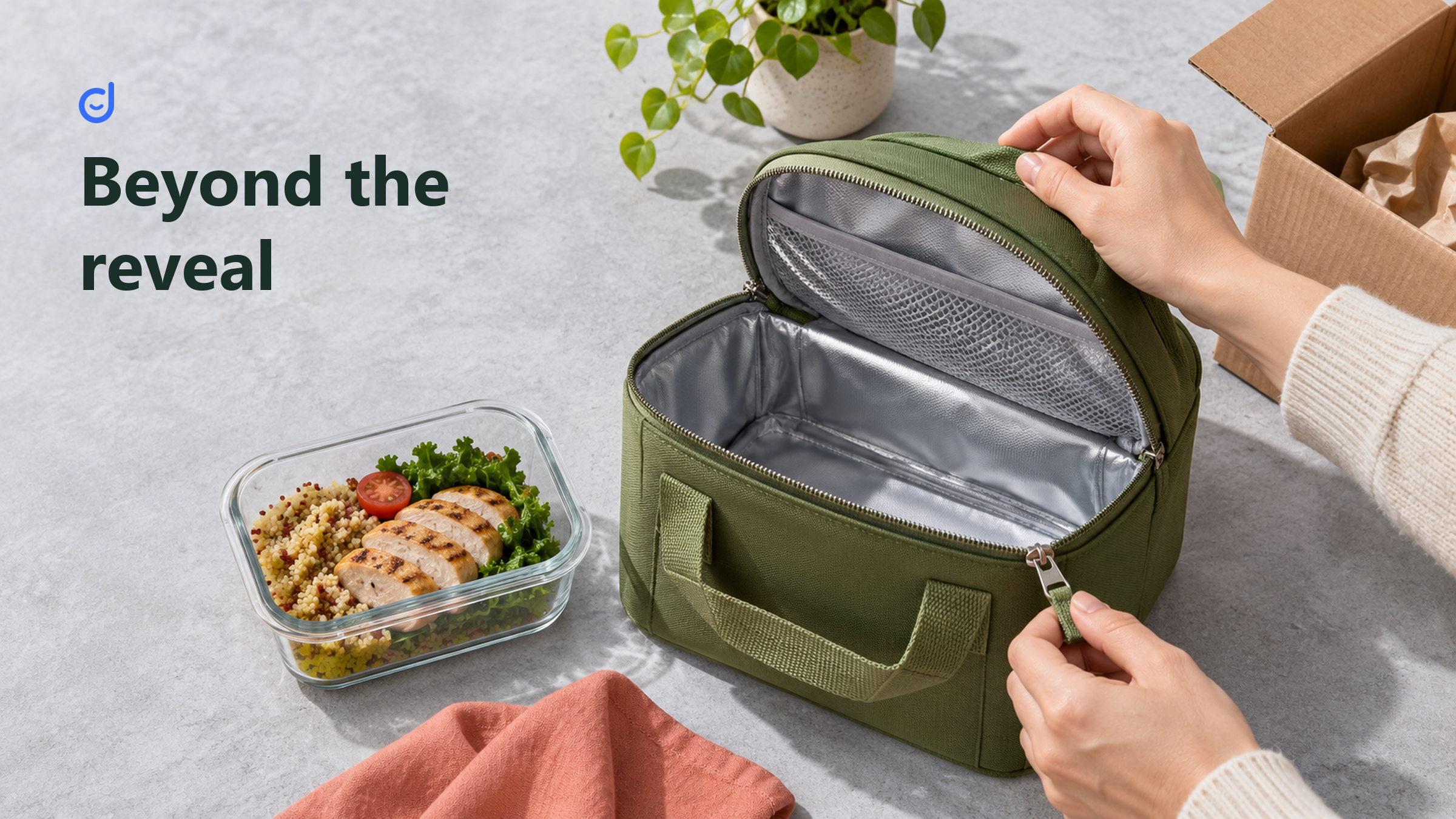
Imagine a shopper looking at an insulated lunch bag. The product page lists its size, but the shopper still wants to know whether their lunch container will fit. Your video can answer that with a simple action: open the bag, place a container inside, add a piece of fruit and close the zip. The scene shows fit. It does not need a long speech about a busy lifestyle.
Use your own product and check the details you plan to show. If a divider comes with the bag, include it. If a container is sold on its own, make that clear when it appears. A viewer should be able to tell what is in the purchase and what you brought to help with the demo. That distinction is part of making a useful reveal.
For a wider range of formats, compare these TikTok video ideas. Choose an unboxing when opening and first use teach the viewer something. If the interesting part is a result after weeks of use, a review may be the better format.
TikTok's official content-style guide includes unboxing alongside other creative formats. That helps define the role of the scene. The table below compares the questions those formats can answer; it is a reading of the guide, not a test of which format sells more.
| Format | Main question | Useful evidence |
|---|---|---|
| Unboxing or opening | What arrives, and what is the first encounter like? | The package, included parts and a clear first-use scene. |
| Personal review | What did the person think after using it? | An honest account of use, with the context needed to judge it. |
| Tutorial | How do I do this task? | A visible sequence that a viewer can follow. |
Source: TikTok Shop content-style guidance, checked November 17, 2026. The questions and evidence choices are our interpretation of the formats, not measured performance results.
You can blend formats, but keep the promise clear. A first impression can say that the zip feels easy to use during the shoot. It cannot stand in for a long-term claim about wear. A quick setup scene can show where the strap clips in without turning the whole video into a full instruction manual. Give each scene a job and let the product set the pace.
Explore KOLSprite's documented video sorting and script research features for your next reference review. Check the current supported pages and access requirements before use. Use desktop Chrome. On a phone, open this article on your computer to install the extension.
Explore the TikTok research extension
The following example is a proposed shoot, not a report from a real campaign. Its buyer question is simple: will the bag hold the lunch I normally take? The props are the actual bag, its package, a lunch container, a drink and a piece of fruit. Use props that fit your product. A small container chosen just to make the bag look large would weaken the demonstration.
Shot one: give the package a setting. Put it on a clear table with the lunch container nearby. The container gives the viewer an early clue about the coming test. A possible opening line is, “Let's see how my usual lunch fits.” You can also use brief on-screen text if speech would distract from the sound of opening the package.
Shot two: reveal the item. Open the package and lift out the bag in one readable action. Keep the parts that show how it arrives. Cut the repeated struggle with tape unless that struggle is the point of an honest review. There is no need to make a routine opening look dramatic through a string of fast cuts.
Shot three: show the space. Open the main compartment and hold it where light reaches inside. Let the viewer see the base and the opening. A close-up of the lining may be useful, but follow it with a wider view so the detail has context. Hands should help reveal the space rather than cover it.
Shot four: test the fit. Place the container inside, add the other items and close the bag. Keep the key action visible. If it needs a different container shape, show that rather than hiding a swap in the edit. A useful line names what the viewer can see: “This container sits flat, and the drink fits beside it.”
Shot five: resolve the first-use question. Lift the packed bag or show how it will be carried. End on the answer the scene supports. You might say, “That's my lunch packed,” and show the closed bag. If care before first use matters, show the label or give a short, accurate reminder based on the actual instructions.
Change the sequence when your product calls for it. A fragile object may need a view of its protection. A kit may need a brief layout of the included parts. A bag that ships folded may need a moment to show its shape. The point is not to copy five shots in every video. It is to move from the package to a piece of useful knowledge.
Natural sound can make the opening feel close and tangible. The tear of paper, a zip or a lid being placed on a table may be enough to carry a shot. Record a clean take without talking over every action. You can choose later which sounds help the viewer follow the scene.
A voiceover is useful when the picture leaves a question open. It can explain that the strap is packed inside or that the container is a prop. It adds less when it repeats exactly what the hands are doing. “Now I am opening the box” usually tells the viewer less than a line about the reason for opening it.
Try one viewing with the sound off and another without watching the screen. The silent pass tells you whether the action reads clearly. The audio pass reveals vague lines, awkward gaps and claims that depend on unseen proof. This is an editing exercise, not a promise that every viewer watches in one way. Use the result to decide what needs text, a closer shot or no explanation at all.
Keep important words concrete. “Fits this container” is easier to judge than “perfect for every day.” If a line sounds like a slogan, ask what the camera can show in its place. The answer may be a better shot rather than a better adjective.
Join the KOLSprite Discord to discuss the question behind your next product video.
 +
Join the KOLSprite Discord community
Before a shoot, review a few examples of TikTok unboxing videos with a similar product or buyer question. Look for the moment when the reveal turns into use. Is the item shown clearly? Does the speaker explain something the image cannot? Does the ending answer the opening question? These are more useful notes than a list of phrases to copy.
KOLSprite can support this research step. Its documented extension features include video sorting and subtitle or script research. Use those capabilities to select relevant references and inspect their words, then check your notes against the video itself. An original brief should describe the buyer question and the action you want to show, not reuse another creator's distinctive lines.
KOLSprite is the research aid here, not the camera or editor. The public feature description does not establish that every video, page or plan supports the same options. Check current access before relying on a feature. A transcript can help you examine speech; it does not show what happened on screen or explain why a video performed well.
For the text-review part, see how to research a video transcript. Bring one specific question, such as whether the spoken promise is backed by the first-use scene. That gives the tool a clear role without turning your shoot into a data-collection exercise.
Watch the rough cut as if you had not held the product. Can you tell what comes in the box? Can you see the first-use detail? Does the last shot resolve the question you started with? If not, another transition is unlikely to fix it. You may need a missing action, a wider view or a more modest opening.
For the lunch bag, keep the shot where the full container passes through the opening. Keep the closure if fit is the point. You can shorten the pause while someone moves the empty box away. This kind of cut makes the video brisk without making the proof hard to inspect.
Ask someone who did not attend the shoot what they learned. If they remember the tissue paper but cannot describe the bag's use, the reveal has taken over. If they think the container is included when it is not, correct that impression. Those answers tell you more about clarity than whether the cut looks polished to the team that made it.
A helpful product story has a small change the viewer can follow: an item goes from packed away to ready for a real task. The guide to TikTok storytelling explores that role in more depth. Here, keep it simple. Let the box invite attention, then spend that attention on the product in use.
Strong TikTok unboxing videos do not need to turn every package into a spectacle. Choose a question worth answering, show the relevant detail and finish with the answer your footage can support. For your next shoot, write that question on the brief before listing camera angles. It is the clearest way to decide what deserves to stay in the frame.
Latest Articles
As an essential, data-driven toolkit for TikTok influencers and marketers, KOLSprite provides powerful features for effortless creator discovery, trending content identification, and actionable real-time insights.
It empowers users to make smarter decisions and significantly boosts their TikTok business.

 Refer & Earn