Why do other sellers always pick products that explode on TikTok? While your products always flop? Facing massive amounts of data and products, should you follow the trend or dig independently?
Successful product selection is not luck, but a scientific decision based on data insights. To help cross-border sellers solve the problem of product selection, Kolsprite has deeply integrated TikTok e-commerce data and launched the powerful "TikTok Product Selection" function.
Today, this comprehensive guide will teach you hand-in-hand how to use this tool, reveal the selection logic behind hot sellers, and help you build a complete closed loop from "Trend Discovery" to "Sourcing Implementation," saying goodbye to selection anxiety and firmly seizing opportunities!
👉 Kolsprite Web Version - TikTok Selection Function Entry: Click here to enter
💡 Reading Tip: Click "Article Navigation" on the right to jump to the corresponding section to view details :)
I. Kolsprite "TikTok Product Selection" Function: Your TK Selection Data Center
1.1 TikTok Product Selection Function Introduction
The "TikTok Product Selection" function on the Kolsprite web version is a data-driven selection platform integrating trend insight, data verification, and precise mining. It is your TK Selection Data Advisor, turning complex market information into clear lists and search results, helping you quickly find those potential stocks that grow fast, have high demand, and low competition, and accurately grasp new market opportunities.
- Function Path: Kolsprite Web End >> Click "Product Selection" (选品) in the top navigation bar >> [Rankings] / [Product Database - Product Search]
 +
+
1.2 Four Major Selection Methods, Covering Different Scenario Needs
The selection function is mainly divided into two major sections with 4 core methods. Whether you want to find new opportunities or "copy hot seller homework," you can find the corresponding tool:
Section 1: Product Rankings (Trend Discovery and Verification)
- Emerging Hot Products List: Focuses on products with rapidly climbing recent sales; you can quickly capture Blue Ocean opportunities.
- Product Sales List: Analyzes mature hot sellers leading in historical sales; you can learn successful models and conduct steady selection.
- Hot Promoted Products List: Quickly understand the trends of products heavily promoted by influencers; you can predict marketing trends and find promotion opportunities.
- Section 2: Product Search (Precise Mining and Screening)
- Keyword Search: Through keywords and multi-dimensional filtering, you can precisely excavate niche market opportunities.
 +
+
1.3 TikTok Product Selection Function Panorama
The image below is your selection navigation map, allowing you to see the entire operation route at a glance:
[Image Placeholder: Functional Panorama Map]
- Trend Discovery: Emerging Hot Products List, Product Sales List, Hot Promoted Products List.
- Precise Mining: Keyword Search (Filter by Country, Category, Time, etc.).
- Execution: Clear filters, Favorites, View Details, Source from 1688.
- Marketing Promotion: Video/Shoppable Video Search, Shop Search, Other Rankings.
- 👉 Kolsprite Web Version - TikTok Selection Function Entry:Click here to enter
II. "TikTok Product Selection - Rankings" Detailed Explanation: Quickly Discover Hot Trends
How to quickly find products with soaring sales on TikTok recently?
2.1 Emerging Hot Products List: Your "Blue Ocean Market Detector"
- Function Value: The "Emerging Hot Products List" focuses on the short-term sales growth rate of products, rather than absolute sales figures. It is the core tool for discovering potential hot sellers. Products ranking high are usually in the early stages of market explosion, which is your window of opportunity to seize the Blue Ocean.
- Function Path: Product Selection >> Rankings >> Emerging Hot Products List
 +
+- Function Description: Click Country/Region, Product Category, and set the target site and category in the dropdown menu → View the Emerging Hot Products List for your target site (Country/Region) and category.
 +
+- 📢 Usage Tips:
- ① Drag the horizontal scroll bar at the bottom of the page to view more data indicators: Number of promoting influencers, Number of promoting videos, Listing time;
- ② Hover the mouse over the "?" to the right of the indicator, and the system will automatically display the explanation of the indicator~
- Note: Product Selection Function Header Indicator Explanation
- Please view the detailed explanation of the selection function header indicators in "FAQ: Q7" at the end of the article.
- 【Practical Application】
- Scenario 1: Finding the Next Hot Seller
- If you want to avoid the fiercely competitive "Red Ocean" products (such as ubiquitous phone stands) and hope to find novel toys like the "Carrot Squishy" that suddenly became popular last year?
- Keep an eye on the Emerging Hot Products List. Here, you can discover those "potential stocks" whose sales suddenly start to climb earliest.
- Scenario 2: Testing New Product Market Reaction
- Suppose you found a uniquely designed piece of jewelry but aren't sure if there is a market on TikTok?
- You can select the corresponding category (such as Fashion Accessories, Jewelry & Derivatives, etc.) in the "Emerging Hot Products List - Product Category" to see if there are similar products on the list. If you find similar products starting to show signs of growth, it means this niche market is being activated, and it is a good time for you to enter.
- ✅ Summary: Use "Emerging Hot Products List" to find products that are "about to explode" or "are exploding," with the aim of being one step ahead.
- 【Advanced Skills】
- When using the "Emerging Hot Products List" to dig for Blue Ocean products, focus on these indicators:
- Growth Rate: > 100%, pay close attention to this product, it may be a precursor to a hot seller;
- Price / Original Price: Products with large discounts are often easier to explode; understand the price changes of the product and their impact on sales;
- Rating: > 4.5, indicating that product quality is guaranteed, which can reduce after-sales issues.
How to quickly find TikTok hot-selling products?
2.2 Product Sales List: Your "Hot Seller Model Textbook"
- Function Value: The "Product Sales List" displays products with the highest absolute sales volume within a specific category and region. It reflects the result of market survival of the fittest and is a treasure trove for learning successful cases and conducting steady selection.
- Function Path: Product Selection >> Rankings >> Product Sales List
 +
+- Function Description: Click "Country/Region", "Product Category", select the target site and category in the dropdown menu → View the Product Sales List for your target site (Country/Region) and category.
 +
+- 【Practical Application】
- Scenario 1: Learning Successful Cases
- Suppose you plan to enter the "Kitchen Gadgets" category but don't know what kind of products are popular?
- Open the Product Sales List and study the top 10 products: What is their price range? What common functional points do they have (e.g., all are "one-touch", "easy to clean")? What are the characteristics of their video displays? Learn the successful models that have already been verified by the market.
- Scenario 2: Conducting Steady Selection
- If you have limited funds and don't want to take too much risk, and want to choose some categories with stable sales and continuous demand. Evergreen products on the Product Sales List (such as beauty tools, home storage) are your best choice. Although competition is fierce, market demand is stable.
- ✅ Summary: Use "Product Sales List" to see products that "have already exploded," with the aim of replicating success and operating steadily.
- 【Advanced Skills】
- The key to learning from hot sellers is not just looking at the product itself, but analyzing its underlying pricing, video content style, and influencer cooperation model.
 +
+
How to quickly discover products recently promoted by TikTok influencers?
2.3 Hot Promoted Products List: Your "Influencer Marketing Weather Vane"
- Function Value: The "Hot Promoted Products List" focuses on the marketing side of products. It ranks based on Influencer Promotion Data (Number of promoting influencers, Number of promoting videos). It reflects the marketing heat, allowing you to see the promotion movements of influencers before sales explode, helping you insight into market trends and identify the right time to enter.
- Function Path: Product Selection >> Rankings >> Hot Promoted Products List
 +
+- Function Description: Click Country/Region, Product Category, set target site and category in the dropdown menu → View the list.
 +
+- 【Practical Application】
- Scenario 1: Predicting Market Trends
- You discover a product rising rapidly on the "Hot Promoted Products List," with countless influencers making unboxing and review videos for it, but it is nowhere to be seen on the Product Sales List. This likely means a powerful marketing campaign has started, and a sales peak is coming. At this time, you can stock up in advance to seize the opportunity.
- Scenario 2: Planning Influencer Cooperation
- After you decide on a product and want to find influencers to promote it, you can find similar hot promoted products through the "Hot Promoted Products List" and then check which influencers are promoting these products. These influencers are your potential partners because they already have experience promoting such products and fans who are your target audience.
- ✅ Summary: Use "Hot Promoted Products List" to see products "currently being promoted," with the aim of predicting the market and finding marketing opportunities.
- 【Advanced Skills】
- When viewing the "Hot Promoted Products List," conduct a focused analysis on a specific hot promoted product in the following directions:
- Influencer Promotion Density Analysis: Products with a large number of promoting influencers indicate high influencer recognition and low market education costs.
- Content Creativity Excavation: Learn the influencers' content creation angles and marketing scripts by viewing shoppable videos.
- Cooperation Opportunity Identification: Find influencers promoting products you are interested in to prepare for future cooperation.
 +
+
III. "TikTok Product Selection - Product Search" Detailed Explanation: Precisely Excavate Blue Ocean Opportunities
How to find Blue Ocean products on TikTok through keyword search?
3.1 Product Search: Find Potential Products via Keyword Search
- Function Value: Rankings show the most popular, fastest-growing, or most promoted products, but what you see are already mass-market, highly competitive tracks; Keyword Search can help you bypass fierce Red Ocean competition. Through long-tail words and multi-dimensional filtering, hit niche markets directly and find your own Blue Ocean.
- Function Path: Product Selection >> Product Database >> Product Search >> Search related products via keywords, discover hot/explosive products.
 +
+- Product Search Detailed Module Explanation
- 3.1.1 Keyword Search: Discover Niche Market Opportunities
- Method: Enter product keywords in the keyword input box, click the search button on the right, and view the search results.
 +
+- 📢 Usage Tips:
- ① Click "Keyword" to switch the search method to "Product ID";
- ② Hover the mouse over the "?" to the right of the indicator, and the system will automatically display the explanation~
- ③ Drag the horizontal scroll bar at the bottom of the "Product Search" page to view more data indicators: Number of promoting videos, Listing time.
- 【Practical Application】
- Excavating niche markets and long-tail demands is the most important value of keyword search. Don't just search for broad and general terms; learn to search for "Long-tail Keywords".
- Search Broad Term:coffee
- Result: A large number of highly competitive general products like coffee beans and coffee powder appear. It is difficult for you to compete with large brands.
- Search Long-tail Term:portable espresso maker for camping
- Result: You will discover a very specific application scenario and demand. The competition in this market may be smaller, but the target customers (camping enthusiasts, outdoor workers) are very clear, purchase intention is strong, and profit margins may also be higher.
 +
+- 【Advanced Skills】
- How to find long-tail keywords?
- In your main category, think: Who, in what scenario, needs to solve what problem?
- For example, extend from dog toy to dog toy for aggressive chewers or mental stimulation dog toy.
- 3.1.2 Set Filter Conditions: Precisely Target Markets & Product Categories
- Method: Click "Country/Region", "Product Category", select the target site and category in the dropdown menu → View the keyword search results for your target site (Country/Region) and category.
 +
+- 3.1.3 More Filter Conditions: Precisely Target Potential Products
- Method: Click "More Filters", in the "All Search Conditions" panel that pops up on the right, add: Listing Time, Advanced Search, Number of Promoting Influencers, Price, Rating, Reviews, Total Sales, and other filter conditions. Click Query Results to achieve precise search.
 +
+- 📢 Usage Tips:
- ① When setting "Filter - Price," the price unit matches the Country/Region you set; no conversion is needed~
- ② Search results may take a few seconds for the system to load~
- 【Practical Application】
- ① New Product Discovery Combination
- Listing Time: Last 30 days
- 7-Day Sales Growth Rate: > 50%
- Rating: > 4.0
- Effect: Discover new products with explosive potential just after listing.
- ② Steady Selection Combination
- Total Sales: Min > 1000
- 7-Day Sales: Stable or small growth
- Number of Promoting Influencers: > 10
- Effect: Choose mature products verified by the market.
- ③ High Potential Screening Combination
- Price: $10.0 - 19.9 (Moderate price range)
- Rating: > 4.5
- 7-Day Sales Growth Rate: > 100%
- Effect: Find potential products with high cost-performance ratio and fast demand growth.
 +
+- 3.1.4 Advanced Search: Quickly Locate Special Category Products
- Method: Click "Advanced Search", select from the dropdown menu: New Products, Hot Products, Potential Products, Unmet Needs, High-Rated Products, etc. The system will present the product search results for the selected category.
 +
+- 📢 Usage Tips:
- ① Hover over specific categories like "New Products" to see the definition and explanation:
- New Products: Products listed within the last 3 months.
- Hot Products: Products with high 7-day sales and high period-over-period growth rate.
- Potential Products: Good sales growth rate, listed only within the last 3 months.
- Unmet Needs: Good sales, but poor ratings, room for improvement.
- High-Rated Products: Good sales, good ratings, users are willing to leave reviews.
- ② Advanced search options can also be added directly when setting filter conditions in "More Filters"~
- 【Practical Application】
- "New Products" Option: Suitable for sellers who like to test new products and seize the first opportunity.
- Combine with "Rating > 4.5": Ensure the quality of new products is guaranteed.
- 3.1.5 Sort by Condition: View Search Results Sorted by Different Conditions
- Method: In the "Sort By" dropdown menu on the right, select as needed: Relevance, Price, Original Price, 7-Day Sales, 7-Day Sales Growth Rate, etc.
 +
+- 【Practical Application】
- Testing Phase Products: Sort by "7-Day Sales Growth Rate" to find products with an upward trend.
- Stable Operation Phase: Sort by "7-Day Sales Amount" to find products with stable output.
- Price Sensitive Selection: Sort by "Price" to find products suitable for your budget.
IV. Execution: Efficiency Improvement Skills & Selection Workflow
Efficiency Improvement Skills
4.1 Clear Filters: Quickly Start the Next Round of Selection
When using the TikTok Selection function, click "Clear Filters" on the right to clear all set filter conditions with one click and quickly start the next round of filter settings.
 +
+
4.2 Favorites Function: Create Your High-Potential Product List
When using the TikTok Selection function, click the "Star" icon on the right to add intended products to favorites.
 +
+
When favoriting products, you can also customize "Create New Collection" to classify and manage intended products, such as creating lists for High Potential Products, Hot Seller Study, Trend Observation, etc., to facilitate in-depth data analysis and trend monitoring of intended products later.
 +
+
💡 How to view and manage product collections?
In the Product Database of the selection function, click "Product Favorites" to enter the product collection folder to quickly view and manage favorited products.
 +
+
4.3 View Details - In-depth Analysis of Intended Products
When using the "TikTok Selection - Rankings/Product Search" function, you can click the "Eye" icon on the right of the target product to view product details.
 +
+
On the product details page, you can view detailed data performance of the product, including: Last 30 Days Data Overview, Performance Trends, Product Reviews, Associated Influencers, Associated Videos, Associated Keywords, Similar Product Recommendations, etc., allowing for deep dismantling and data analysis of the target product.
 +
+
4.4 Go to 1688 to Source - Directly Initiate Selection Process
When using the "TikTok Selection - Product Search" function, you can click the "Shop" icon (often represented as looking for suppliers) on the right of the target product to jump directly to the "1688 Cross-border E-commerce" sourcing page and initiate the sourcing process directly.
 +
+
 +
+
4.5 Mature Seller's Selection Assembly Line
- Trend Scouting (Hot Promoted Products List): Browse for 5 minutes daily to sense market promotion heat.
- Trend Verification (Emerging Hot Products List): Verify the sales growth of hot promoted products.
- Deep Digging (Product Search): Lock in potential categories, analyze competing products and differentiation opportunities.
- Model Replication (Product Sales List): Reference mature products to formulate launch strategies.
- Action Implementation (Go to 1688 to Source): Complete the last mile of product selection.
- 👉 Click here to immediately experience Kolsprite Selection Function
V. Efficiency Bonus: The Operational Closed Loop from Hit Discovery to Promotion Explosion
We have detailed the selection function of Kolsprite above and sorted out the complete selection decision process of "Trend Discovery → Precise Mining → Implementation" for everyone. Now you have mastered the core skills of mining potential hot sellers.
However, a top seller must not only know "what to sell" but also be proficient in "how to sell". In Kolsprite's "TikTok Selection" function module, you can also quickly handle content planning and competitor analysis, easily building a complete operational closed loop from "Selection Decision → Content Packaging → Product Promotion".
- Video/Shoppable Video Search: After locking in a product, use it to quickly find hot videos of similar products, dismantle the script structure and marketing scripts of high-conversion content, get content inspiration, replicate successful models, and quickly produce hot content.
- Shop Search: Just like searching for products, quickly find competitor shops through keywords, deeply study opponents' selection, pricing, and promotion strategies, truly knowing yourself and the enemy, and optimizing your own battle plan.
- Other Ranking Lists: In addition to selection, the "Shoppable Video List" and "Hot Playback List" in the rankings are also treasures. They can help you quickly lock in high-quality influencers in vertical fields and reserve influencer resources for subsequent promotion cooperation in advance.
 +
+- These functions will work in synergy with core selection capabilities to help you achieve full-link control from selection to profitability. Regarding their specific usage skills, we will explain them in depth in subsequent guides. It is recommended to bookmark the Kolsprite official website or follow the Kolsprite official account to keep up with content updates~
- 👉 Click here to bookmark Kolsprite Official Website
VI. Frequently Asked Questions (FAQ)
Q1: Is Kolsprite's selection function free?
A: Kolsprite Web Version "TikTok Selection" function currently provides three usage modes: Visitor Version (Free), Trial Member (Free), and Paid Member.
 +
+
👉 Click here to learn more about pricing details and discount policies
Q2: Does Kolsprite have any discount policies now?
A: Currently, it is in the product internal beta period. Beta users can enjoy a large discount of 50 yuan, becoming a Kolsprite web version paid member for only 49 yuan/month~
Q3: How to issue an invoice? Is there an extra charge?
A: 1. After successful purchase, please contact customer service to issue an invoice; 2. There is no extra charge for invoicing. Invoice types available: Electronic General Invoice, Electronic Special Invoice (Default is Electronic General Invoice).
Q4: Does it support multi-device login?
A: Each account only supports login and use on one device (one browser web page).
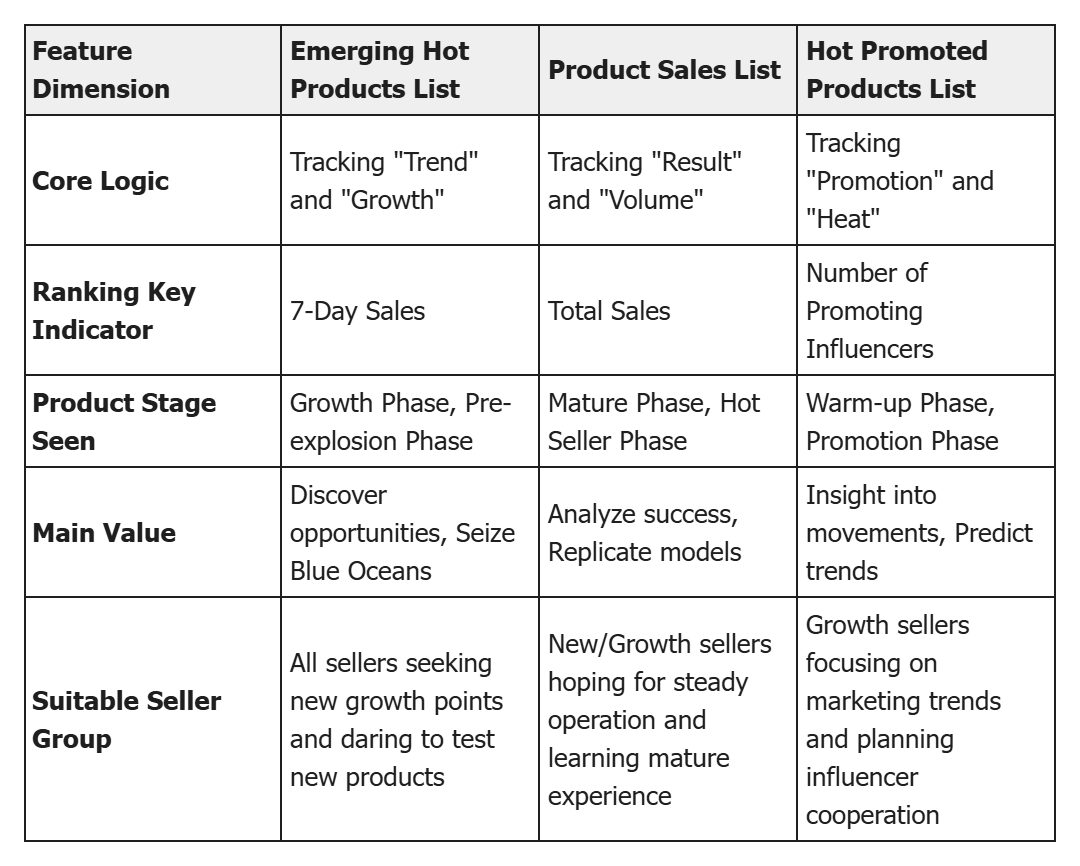
Q5: How to use "Emerging Hot Products List / Product Sales List / Hot Promoted Products List" for selection decisions?
A: In actual cross-border selection scenarios, the differences and applications of the three lists are as follows:
 +
+
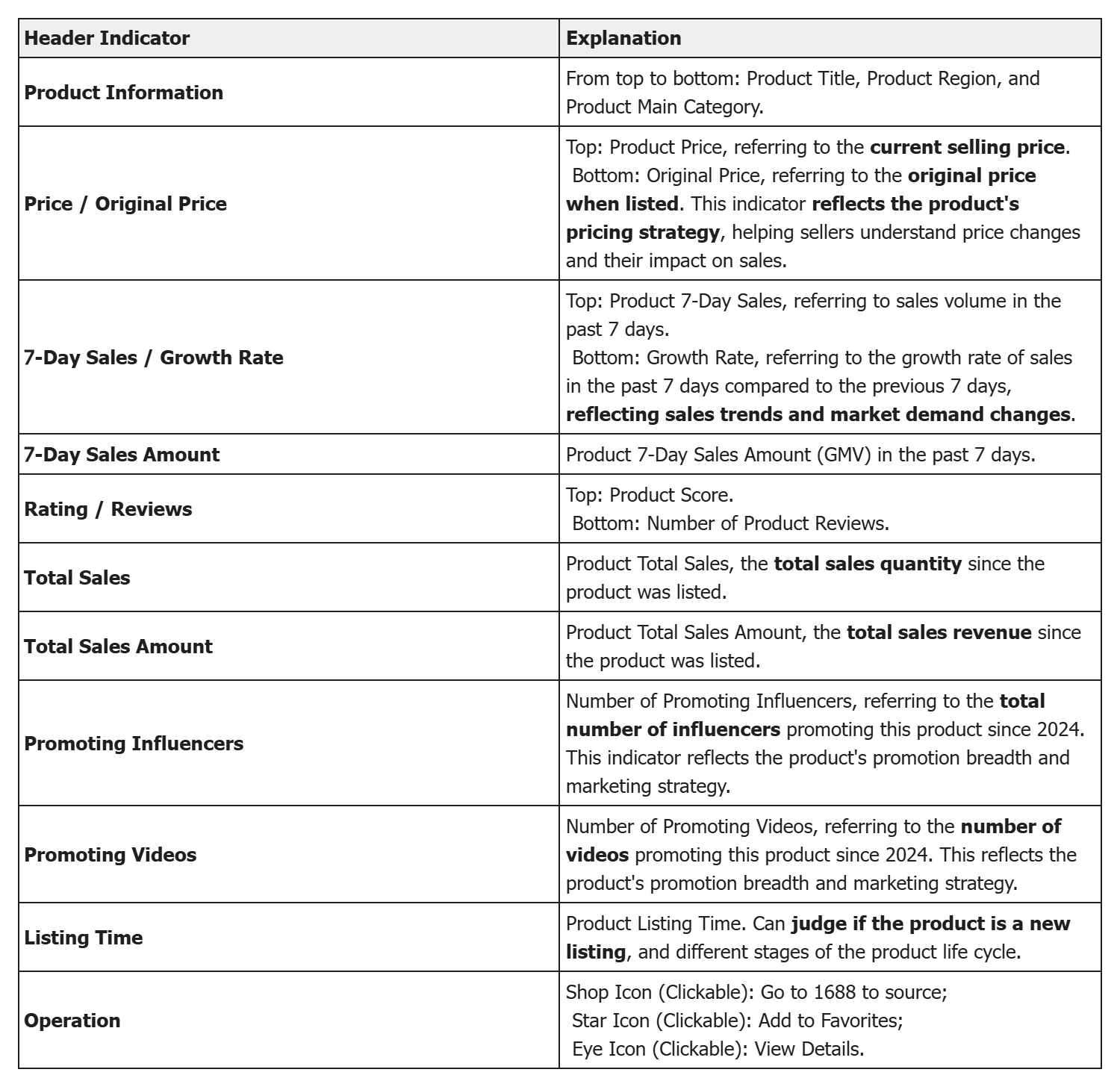
Q6: What do the indicators in the selection function mean?
A: The explanation of the Selection Function Header Indicators is as follows:
 +
+
VII. Summary and Action Guide
Now, you have mastered the complete methodology of using Kolsprite for data-driven selection: from macro trend grasping (3 Major Lists) to micro opportunity mining (Product Search). These tools allow you to stay sharp in the fiercely competitive cross-border market.
Now, open Kolsprite and start your precise selection exploration from the category you are most familiar with!
👉 Kolsprite Web Version - TikTok Selection Function Entry:Click here to enter
 +
+
About Kolsprite
Kolsprite is a TikTok data analysis and product selection tool under the official SellerSprite ecosystem, specifically built for cross-border e-commerce sellers.
Core Function Matrix
- Influencer Precise Analysis: Deep insights into influencer data health, content tonality, and cooperation value.
- Selection & Trend Discovery: Track TikTok hot products and content trends to provide forward-looking insights for Amazon selection.
- Content Inspiration & Optimization: Provide hot seller screening and AI script analysis & rewriting assistants to improve content creation efficiency.
- Efficient Workflow: Through the browser plugin, achieve a seamless experience of "Analyze as you watch."
- As an important part of the SellerSprite ecosystem, we are committed to building a complete data closed loop from Amazon selection to TikTok traffic generation, empowering Amazon sellers to drive new business growth with TikTok traffic.
- 👉 Experience the powerful synergy of the SellerSprite ecosystem immediately
- Learn about SellerSprite: https://www.sellersprite.com/
- Learn about Kolsprite: https://www.kolsprite.com/

 Refer & Earn