 +
+
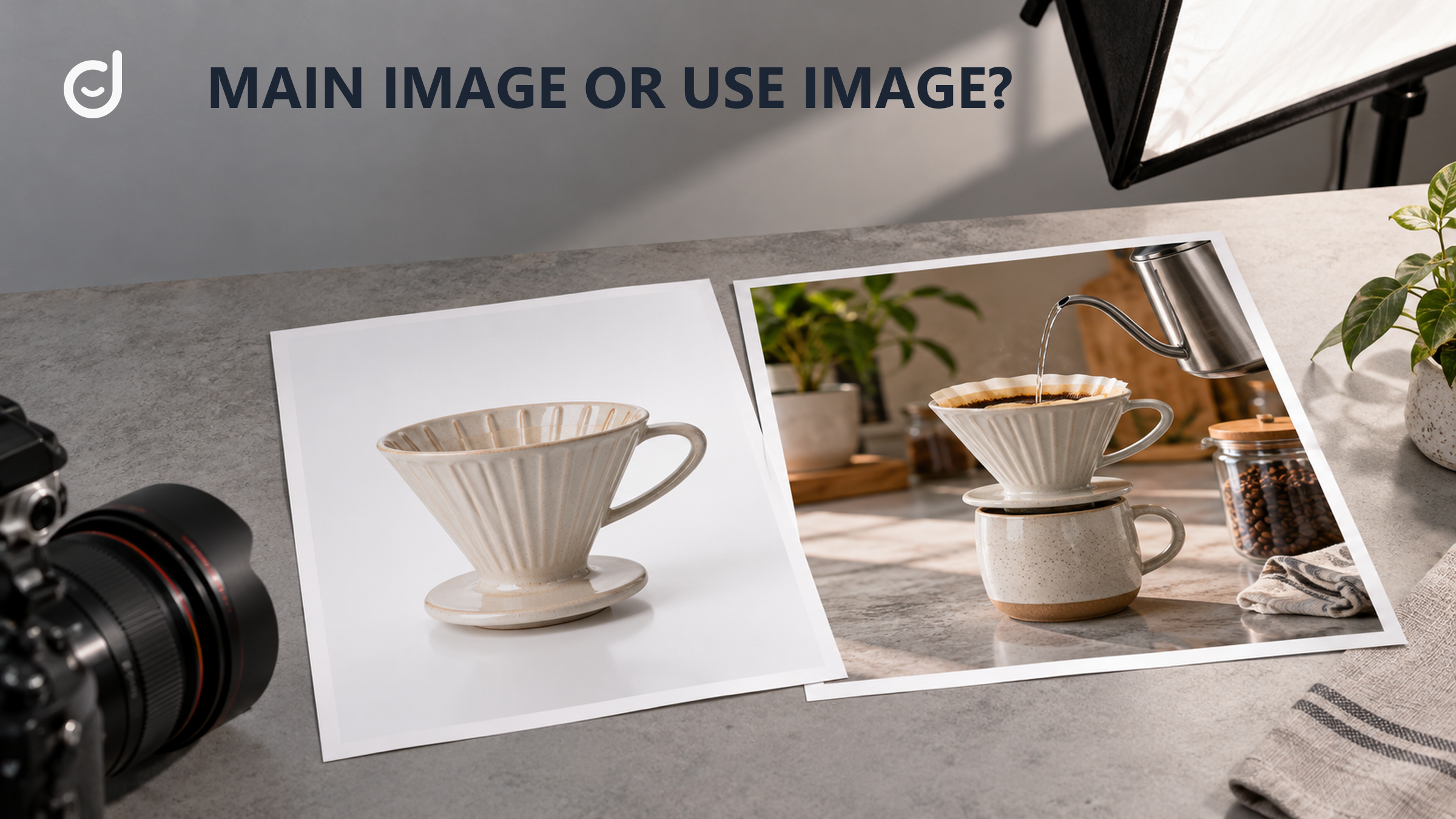
For Amazon product image requirements, check the MAIN file before the rest of the gallery. Amazon's US guide calls for the product to fill about 85% of the frame, appear in full, and sit on a pure white background. Show only the item for sale and included accessories, without added text, graphics, or a lifestyle setting. Then check the current file specifications and any category rules. A useful secondary image may still be wrong for MAIN.
You have a still-photo set ready for a US Amazon detail page. Before judging which shot is most persuasive, identify the file that will be MAIN. That file needs to meet Amazon's current MAIN rules and the technical rules that apply to every image. The remaining slots can answer buyer questions with clear views of scale, features, and use. This pre-upload audit separates a strict first image from the context that belongs elsewhere.
The MAIN image is the first visual promise a shopper sees in search and on the product page. It also has the most constrained role. Amazon's guide distinguishes requirements for MAIN from rules that apply to all product images. Treat that distinction as a design boundary, not as a minor export setting. A striking scene can still be the wrong first file if it fails the marketplace rule.
The exact exported MAIN file matters more than a design mockup. Is the background pure white, RGB 255, 255, 255? Does the real product occupy about 85% of the frame while remaining fully visible? Is it shown only once, with no prop that might look included? Added text, badges, watermarks, and decorative graphics do not belong in this frame. Amazon's US Product image guide gives these MAIN rules and the current file specifications; a category may add its own conditions. A photo can look attractive in a review and still fail a marketplace rule.
Once the file is compliant, ask a simpler visual question: can the buyer recognize the product quickly? The main image earns permission to appear; the rest help a buyer understand. A clear, faithful view is more useful here than a composition that hides the item to create mood. If the product has an important included part, make sure the photo and listing do not leave its status ambiguous. If a prop is only there to suggest scale or use, reserve that context for a secondary slot and describe it honestly there.
| Photo decision | MAIN review | Secondary review |
|---|---|---|
| Product identity | Show one complete view of the actual item and included accessories. Aim for about 85% frame fill. | Add views that explain parts, scale, or a feature not clear in the first frame. |
| Setting and added elements | Use pure white (RGB 255, 255, 255). Remove extra props, text, graphics, and badges. | Use context only when it clarifies use and does not misstate what is included. |
| File quality | Check current technical rules; Amazon recommends 1,000-plus pixels for zoom. | Check the same all-image rules and whether detail stays legible on a small screen. |
| Illustrative choice | A clean product view is the candidate for MAIN, subject to the guide. | A room scene can explain where the product fits, subject to the guide. |
Source: Amazon Seller Central, US Product image guide, checked October 14, 2026. The MAIN rules above come from Amazon; the secondary-image jobs are editorial examples, not a compliance verdict.
Image reviews often jump straight to which photo sells best. That discussion is premature if the file cannot be uploaded. Each original needs a full-size check beyond its slide-deck preview. File type, dimensions, and other technical conditions should match Amazon's current guide. Amazon recommends 1,000-plus pixels for zoom, but that does not replace the other current specifications. An image can be large enough for zoom yet still have a problem with composition or content.
Inspect sharpness at the part a buyer needs to judge. A fabric weave, connector, label, or small control may look clear in a desktop preview and become unreadable on a phone. If detail is central to the purchase, give it a dedicated secondary view rather than expecting a shopper to enlarge the first image and hunt. Retouching should remove distractions without changing the product's color, finish, or shape. The gallery has to reduce uncertainty, not make the delivered item feel different.
Also check consistency across the set. If the MAIN photo shows one color but later images show another without clear variant context, a buyer may wonder what will arrive. If packaging appears in one frame, make its role clear. If an accessory is shown, confirm whether it is included. These are not only policy questions; they are trust questions. A technically accepted gallery can still create preventable returns if it leads buyers to imagine a different product.
Keep product demand research separate from this audit. A popular use case may tell you what a gallery should explain, but it does not decide whether a still image meets Amazon's rules. Demand research and listing-media compliance are different jobs. Finish the compliance pass on the exact files first, then use demand insights to choose which legitimate features deserve more attention in the other slots.
Secondary images have room to do work the first image cannot. One can show scale beside a familiar setting, if the comparison is clear and allowed. Another can reveal how a part opens, fits, or connects. A third can show the product in use. Choose each view because it answers a buyer question, not because the gallery has another empty slot. If two images make the same point, replace one with an angle or detail that removes a different doubt.
The buyer's question should guide each planned frame. "How large is it on a desk?" calls for a truthful scale view. "What comes in the box?" calls for a precise contents view. "Will this fit my setup?" may call for dimensions or a clear detail of the relevant connection, subject to Amazon's current rules for that slot. A generic lifestyle scene might be attractive, but it is weak if the shopper still cannot answer the question that blocks purchase.
Review the sequence as a buyer would see it on a phone. The second image should not depend on the sixth for essential context. Put the most important uncertainty early: size, fit, included parts, or the feature that makes the product different. Keep any labels readable and tied to the visible feature. Do not let annotation cover the very detail it claims to explain. If a comparison uses another object, make sure the frame does not imply that object is part of the offer.
Use a visual distinction only when the product can support it. Choose the product difference that secondary images should explain, then photograph evidence of that difference. For example, if easier storage is the claim, show the item stored and the space it takes. Do not substitute a decorative icon for a view of the actual mechanism. A gallery should let the shopper verify the claim with their eyes.
List each filename, intended slot, product or variant shown, and the buyer question it answers. Put MAIN on its own row. For that row, record five checks: white background, about 85% frame fill, full product in frame, only the item and included accessories, and no added text or graphics. Add the current guide check date, file format and dimensions, any category exception, and the fix still needed. For every other row, record the all-image rule check, file quality, and whether props or context could mislead a buyer about what is included.
Mark each file ready, revise, or replace. Ready means the rule check and the buyer-purpose check both pass in your review; it is not a guarantee of Amazon approval. Revise means the subject is useful but the current crop, clarity, or added element needs work. Replace means the frame answers no new question or creates a false expectation. Have one owner confirm the final exported files, not only the approved mockups, before upload.
For the next decision, Use post-launch buyer feedback to revise the gallery story
After upload, inspect the live gallery. A file can be assigned to the wrong slot or display differently from the local proof. Check the first image in search and on the detail page, then tap through the set on a phone. If Amazon rejects or changes an image, use the current guidance and the specific account message to repair it. Do not assume that a published image will remain acceptable under every later policy or category review.
Amazon product image requirements matter most at the start of this process: they decide what the MAIN file can be and what every file must meet. The gallery's second task is editorial. It should show the real product, answer a sequence of buyer questions, and set a fair expectation. Keep those tasks distinct, and you can make the photo set both more likely to upload cleanly and more useful once it is seen.
Once the gallery is live, use buyer feedback to revise the gallery story when a recurring question shows that a needed view is missing.
Latest Articles

As an essential, data-driven toolkit for TikTok influencers and marketers, KOLSprite provides powerful features for effortless creator discovery, trending content identification, and actionable real-time insights.
It empowers users to make smarter decisions and significantly boosts their TikTok business.

 Refer & Earn